Built for seniors — and the families who protect them

Know the moment someone tries to scam your parent

KinSentry blocks the remote-access and tech-support scams that target older adults — and alerts you the instant one is attempted. Install it once on their computer. It works quietly in the background.

Add to Chrome — Free Start 30-day free trial
Runs on the device No screen recording No browsing history
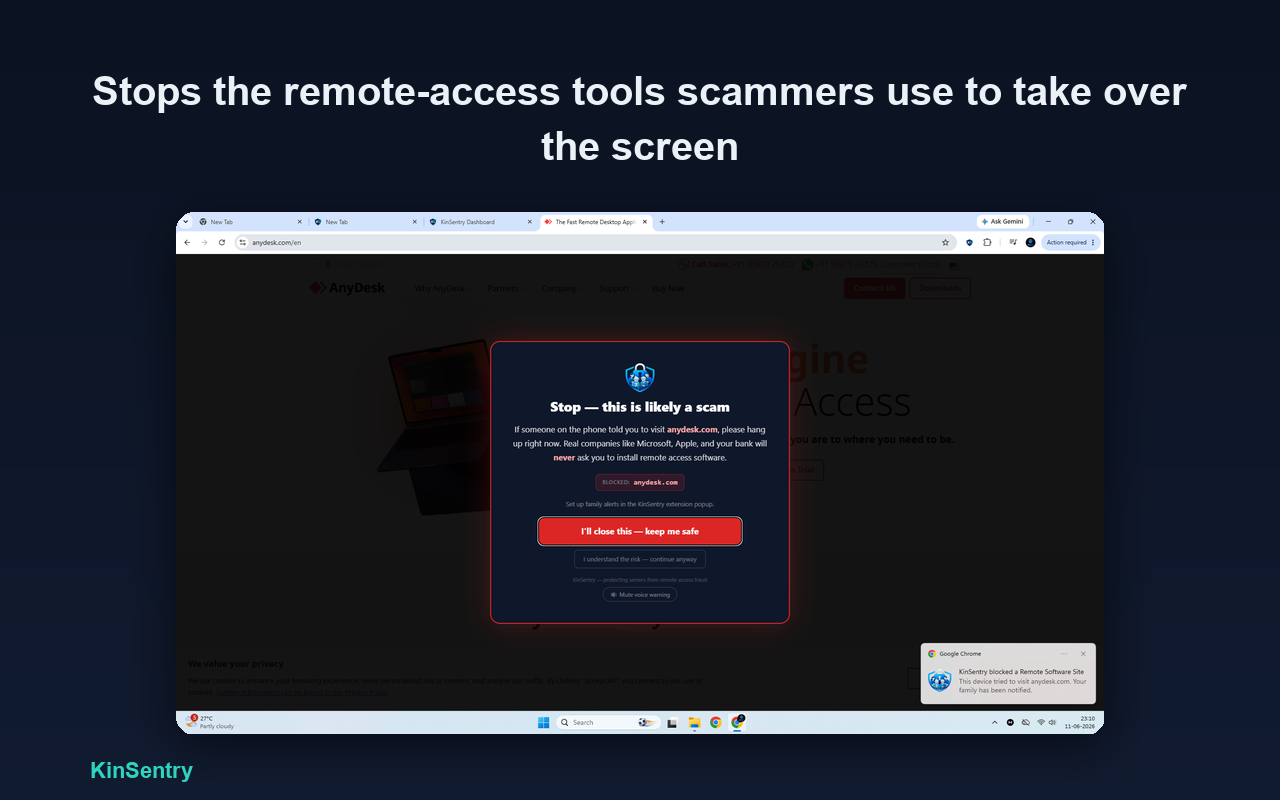
KinSentry blocking a remote-access scam site, with a notification telling the family the device was protected.
The scam crisis — by the numbers
$0B
lost by Americans 60+ to fraud in 2025
more likely to lose money to tech-support scams than younger adults
$0B
lost to tech- & customer-support scams by older adults in 2025
0+
older fraud victims reported to the FBI in 2025
What one scam costs
≈ $0
the average loss for an older fraud victim — often from a single scam.
Source: FBI Internet Crime Complaint Center (IC3), 2025

Figures reported by the FBI Internet Crime Complaint Center (IC3), 2025 and the U.S. Federal Trade Commission. "Older adults" refers to people aged 60 and over. Reported losses only; actual losses are believed to be far higher.

You can't sit at their computer all day. That's the scary part.

Scammers phone your parent, panic them with a fake virus warning, and talk them into handing over control of their computer. You only find out after the money's gone — if you find out at all. Telling them "just be careful" doesn't work against a professional doing this all day.

Why their antivirus won't save them

These scams don't use a virus. They work by convincing the person to install real remote-access software (like AnyDesk or TeamViewer) and grant control themselves. To antivirus, that's legitimate software being installed normally — so it does nothing. KinSentry is built for the exact way seniors actually get defrauded.

How it works

Three steps. You do the first one; KinSentry does the rest.

STEP 1

Install it on their computer

Add KinSentry to Chrome on your parent's computer in about 60 seconds. There's nothing for them to manage.

STEP 2

It blocks scams in real time

It quietly watches for remote-access sites, fake virus pop-ups, scam pages and phishing emails — and stops them with a clear, spoken warning.

STEP 3

You get alerted

On Guardian, a family contact is notified by SMS & WhatsApp the moment a scam is blocked — so you know to check in, even if they never mention it.

See it in action

Clear, senior-friendly warnings — and a dashboard that shows you everything it's caught.

A full-page warning stopping a remote-access download site, with a notification that the family was alerted.
Blocks the remote-access tools scammers use to take over the screen.
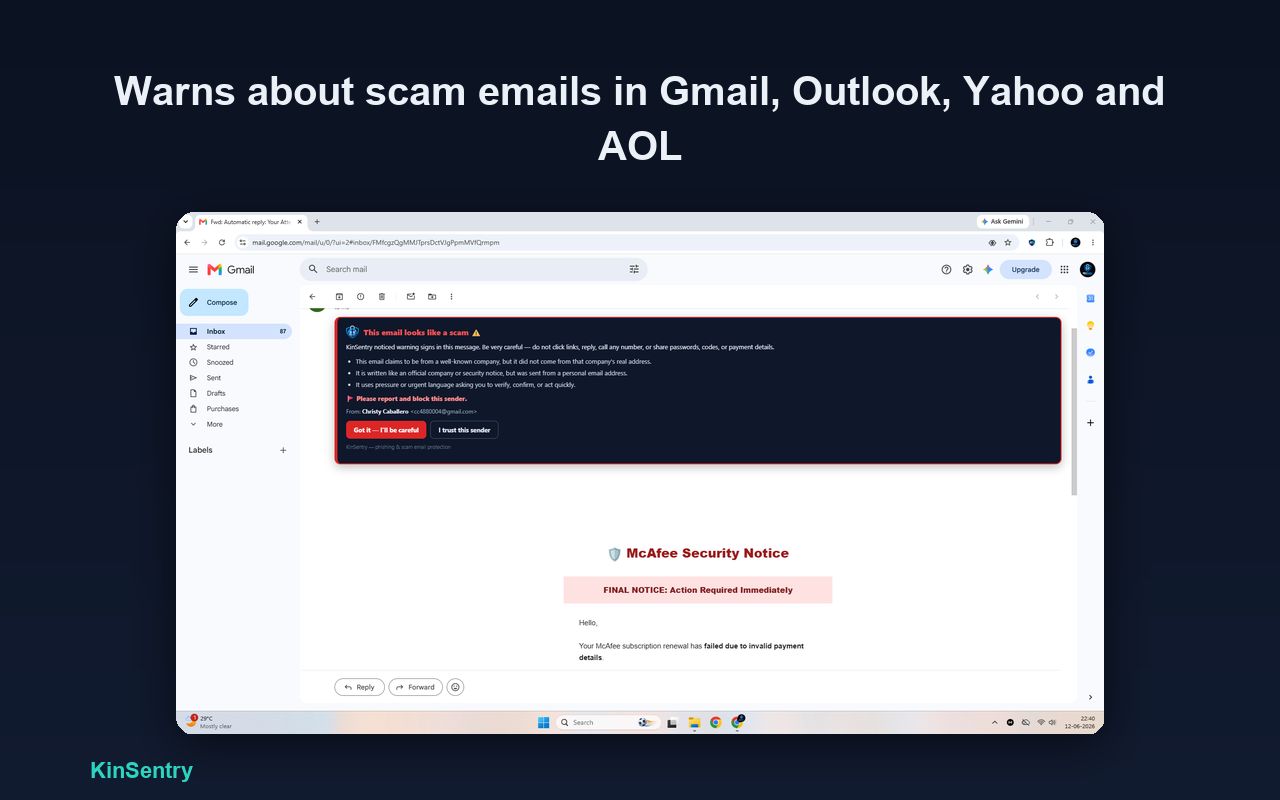
A red scam warning banner shown over a phishing email in Gmail.
Warns about scam emails in Gmail, Outlook, Yahoo and AOL.
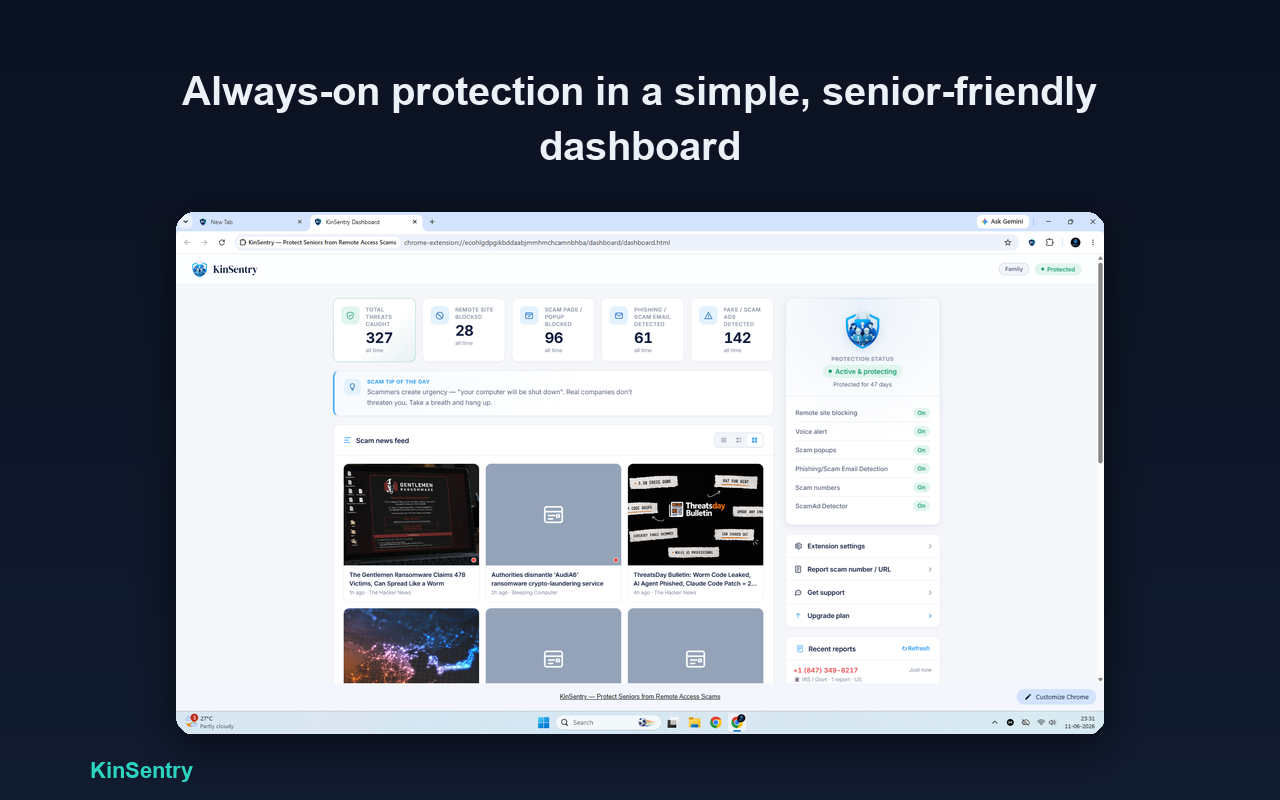
The KinSentry dashboard showing threats caught and protection status.
A simple, always-on dashboard of everything it's protected against.

What KinSentry stops

🖥️

Remote-access takeovers

Blocks the download sites for the software scammers use to control the computer.

⚠️

Fake virus & tech-support pop-ups

Instantly blocks "your computer is infected" scam pages and their fake phone numbers.

✉️

Phishing emails

Flags scam emails in Gmail, Outlook, Yahoo and AOL before your parent clicks.

🔎

Scam search ads

Warns on suspicious sponsored results in Google, Bing, Yahoo and DuckDuckGo.

Not another generic security tool

Most "scam protection" isn't built for the people who actually get targeted — or for the families protecting them from a distance. Here's where KinSentry stands apart.

vs. generic security tools

Built for seniors, not everyone

General extensions aren't senior-simple, don't alert your family, and cost more. KinSentry is purpose-built for older adults and the family looking out for them.

vs. "check this message" apps

Blocks it — doesn't wait to be asked

Those only help if your parent already suspects something and stops to check. The danger is that they don't. KinSentry blocks the scam automatically.

vs. money monitors

Stops it before the money moves

Account monitors tell you after a payment leaves. KinSentry works one step earlier — blocking the scam at the browser, before a dollar is lost.

Generic
security tools
"Check-this-
message" apps
Money
monitors
KinSentry
Built for seniors
Actively blocks scam pagesalerts only
Blocks remote-access takeoverspartial
Works without the senior noticing
Alerts the familysomemoney only
Never sees the screenvaries
Starting price~$9.99/mo~$6.99/mo$19.98+/mo$6.99/mo

See the full comparison & why families choose KinSentry →

Free scam checkers put the job on your parent. KinSentry doesn't.

Free tools can be useful — but they're all reactive. They only work if your parent already thinks something is wrong, stops, and pastes the message in to check it. That's the one thing a good scam guarantees they won't do.

A free checker protects your parent only when they're already suspicious. KinSentry protects them when they're not — which is exactly when scammers win.

Protection — not surveillance

This is the opposite of the remote-access tools it blocks. KinSentry protects your parent without ever spying on them.

Simple, honest pricing

Start free. Every new account gets a 30-day Guardian trial — no card required.

Free

$0
Always free
  • Blocks known remote-access & scam sites
  • Full-page warning when one is blocked
Add to Chrome
Coming Soon

Family

$11.99/mo
or $9.99/mo billed yearly
  • Everything in Guardian
  • Protects up to 3 devices
  • Household dashboard
  • 90 days of history
Coming Soon

Questions families ask

Does KinSentry watch or record my parent's screen?

No. All scanning happens locally in the browser. It never records the screen, never reads passwords, and never stores browsing history. The only thing it ever sends is the web address of a blocked scam site, so your family can be alerted.

Doesn't their antivirus already stop this?

No. These scams succeed by persuading the person to install real remote-access software and grant control. Antivirus sees legitimate software and lets it through. KinSentry is built for the exact way seniors get defrauded.

What if my parent isn't tech-savvy?

You install it once on their computer and it runs quietly in the background. There's nothing for them to manage or configure.

How do I know when a scam was blocked?

On the Guardian plan, KinSentry alerts a family contact by SMS and WhatsApp the moment a scam is blocked — so you know to check in, even if your parent never brings it up.

How much does it cost?

It's free to install and blocks known scam and remote-access sites. Every new account starts with a 30-day Guardian trial — spoken warnings, phishing detection and family alerts — with no card required.
Peace of mind for them,
and for you.

Set it up once and let it run quietly in the background.

Add to Chrome — Free